This is default featured slide 1 title

Go to Blogger edit html and find these sentences.Now replace these sentences with your own descriptions.

This is default featured slide 2 title

Go to Blogger edit html and find these sentences.Now replace these sentences with your own descriptions.

This is default featured slide 3 title

Go to Blogger edit html and find these sentences.Now replace these sentences with your own descriptions.

This is default featured slide 4 title

Go to Blogger edit html and find these sentences.Now replace these sentences with your own descriptions.

This is default featured slide 5 title

Go to Blogger edit html and find these sentences.Now replace these sentences with your own descriptions.

Pages

Showing posts with label codes. Show all posts

Wednesday, June 1, 2011

How to Hide or Show Blogger Navbar

What is a Blogger Navbar?
Blogger Navbar is a nagivational toolbar provided by Blogger.  By defauly, it would appear at the top of every blogspot blogs. Navbar contains:
  •  a search bar (which helps you search anything on the blog you are currently viewing)
  •  share (which helps you promote the blog to twitter, facebook, google buzz, and google reader)   
  •  report abuse
  • next blog (which brings you to some random blogs)
  • email address if you are logged on with your account or none if you haven't
  • if you are the owner of the blog and you are logged on with your account, you see the links of New Post and Design (allowing you to access this services faster)
  • Create Blog if you are not the owner of the blog
  • Sign in or Sign out  which depends on your current state, whether you're logged in with your account or not 
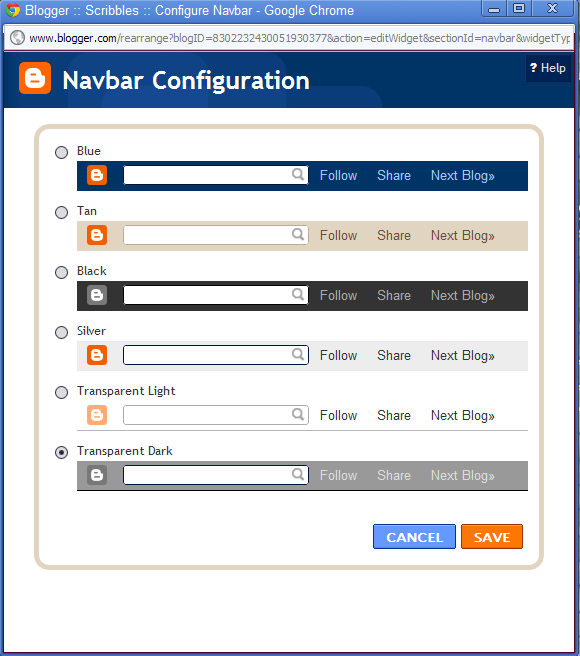
You can configure the navbar by choosing your preferred color.
Just go to Design and select Page Elements.
Find the Navbar design and click Select.
A pop up will appear like the image shown above.

Sunday, January 16, 2011

RoboBot color updated

First and foremost I would want to change my robots color. So here's the code:

setColors(Color robotColor, Color gunColor, Color radarColor); //robot's body, gun, and radar
//sample code
and here are the available colors for our robocode's robots:

black, blue, cyan, darkGray, gray, green, lightGray, orange, pink, red, white and yellow


setColors(Color.red,Color.blue,Color.green);

But then I would want every aspect of my roboBot's parts to change its color.. and here it is..

public void run()
{
setBodyColor(Color.pink);
setGunColor(Color.black);
setRadarColor(Color.blue);
setBulletColor(Color.cyan);
setScanColor(Color.green);
.
.
.
}


Share photos on twitter with Twitpic
(You can never remove pink in my life haha)

Starting with Robocode

Another project in here.. Robocode...
Have you heard about it?? The famous line "Build the best - destroy the rest!"... It's actually coding or developing a tank or a robot tank I guess that you will send into the battle field with other robot tanks, probably a sample robot or your friends own robots too.. It's programming language is Java and I think there's another one but I'm not so familiar with it.. If you wanna check more about it just visit its site.. http://robocode.sourceforge.net/

Hmm.. this is our Individual project from our Software Engineering class. And I just have to start it right now or I won't have much time for it by next weeks... So first thing first.. I opened Robocode's editor and try to see its template.. and here it goes..

package LadyCid;
import robocode.*;
import java.awt.Color;

// API help : http://robocode.sourceforge.net/docs/robocode/robocode/Robot.html

/**
 * RoboBot_Ver1_00 - a robot by (your name here)
 */
public class RoboBot_Ver1_00 extends Robot
{
/**
* run: RoboBot_Ver1_00's default behavior
*/
public void run() {
// Initialization of the robot should be put here
    // After trying out your robot, try uncommenting the import at the top,
  // and the next line:
// Robot main loop
while(true) {
// Replace the next 4 lines with any behavior you would like
ahead(100);
turnGunRight(360);
back(100);
turnGunRight(360);
}
}

/**
* onScannedRobot: What to do when you see another robot
*/
public void onScannedRobot(ScannedRobotEvent e) {
// Replace the next line with any behavior you would like
fire(1);
}

/**
* onHitByBullet: What to do when you're hit by a bullet
*/
public void onHitByBullet(HitByBulletEvent e) {
// Replace the next line with any behavior you would like
back(10);
}
/**
* onHitWall: What to do when you hit a wall
*/
public void onHitWall(HitWallEvent e) {
// Replace the next line with any behavior you would like
back(20);
}
}

I didn't remove the comments for everyone's happiness (lol)..
I named the package by my initials "LadyCid" and named my very first robot as "RoboBot_Ver1_00"
I can't think of any name for now so for the mean time just version 1.00